You know the struggle. You finish a massive project—a 4K video render, a high-resolution logo kit, or a complex code build. You upload it to a file transfer site and email the link to your client.
Then, the chaos begins. You open WhatsApp to text them: “Hey, did you get the link?” They reply on Slack: “Got it. Can you change the font on page 3?” You reply via Email: “Sure, sending version 2 now.”
Suddenly, your workflow is fragmented across three different apps. You are wasting time switching context, searching for feedback history, and managing multiple file versions.
There is a better way.
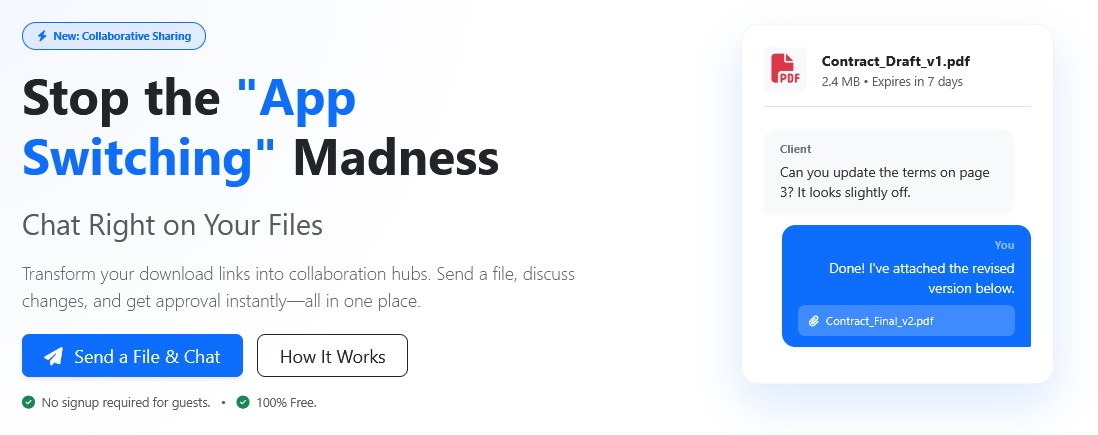
Today, we are launching File Chat on FileXL. It transforms your static download link into a real-time collaboration hub. Now, you can send files, chat, and exchange revisions all in one place.
Why We Built Collaborative File Sharing
Traditional file transfer services are “fire and forget.” You send the data, and the interaction ends. But for freelancers, creative agencies, and video editors, the transfer is just the start of the conversation.
We realized that the context of the file is just as important as the file itself. By building a chat system directly into the download page, we eliminate the friction of “app switching.”
How FileXL Chat Streamlines Your Workflow
This isn't just a comment box. It’s a robust communication tool designed for speed and privacy. Here is why it changes the game for your productivity.
1. Instant Feedback Loop
When you send a large file via FileXL, your recipient doesn't just get a download button. They get a dedicated workspace. They can view your file and immediately type: “This looks great, but let's cut the last 5 seconds.” You see that message instantly. No emails to check.
2. Zero-Friction Guest Access
Most collaboration tools (like Slack, Teams, or Google Drive) force your clients to create an account before they can comment. We hate that friction. With FileXL Chat, no signup is required. We use smart, privacy-first browser cookies to identify the file owner and the recipient. Your client clicks the link and starts typing. It is that simple.
3. Unlimited Revisions in One Thread
Did the client ask for a tweak? You don't need to generate a new link and start a new email thread. Simply drag and drop Version 2 directly into the chat window. The entire history of the project—files and feedback—stays in one organized timeline.
4. Send 100GB Files for Free
While other tools cap you at 2GB, FileXL lets you transfer up to 100GB. This makes it the ultimate tool for video production workflows and raw data transfer where file sizes are massive, but communication needs to be fast.
→ Learn more on our dedicated File Chat page
Who Is This Feature For?
- Video Editors & Motion Designers: Send a 50GB draft render. Your director can watch the preview and comment on specific timestamps in the chat. You upload the fix right back into the thread.
- Freelance Graphic Designers: Share logo concepts. The client can give immediate feedback on colors and shapes without leaving the page.
- Developers: Share a build or a log file. Discuss bugs and upload patches instantly without clogging up your Jira or Slack channels.
- Legal & Corporate: Send contracts and discuss specific clauses securely before downloading.
How to Use File Chat (Step-by-Step)
- Upload Your File: Go to the FileXL homepage and drag and drop your files.
- Share the Link: Copy the unique URL and send it to your recipient.
- Start Talking: On the download page, click the “Message” or “Join Chat” button. A secure popup will appear.
- Collaborate: Type messages or click the paperclip icon to attach revised files.
Is It Secure?
Security is our priority. The chat conversation is private and accessible only to people who possess the unique download link. It is not indexed by search engines. For added security, you can even password-protect the file, which also locks the chat behind that password.
“The chat is seamlessly integrated – our clients love that they don’t have to create an account. It’s saved us hours of email ping-pong.”
— Jamie, video editor
Stop Emailing. Start Collaborating.
The era of fragmented communication is over. Stop chasing clients across WhatsApp, Email, and Slack. Keep your files and your conversation together.
Ready to try it? Upload a file now and experience the fastest feedback loop on the web.